
Last updated on:
Updated on:
Available variants


Agency Pricing Section with Billing Toggle and Comparison Table
This pricing section for Framer is built for agencies that sell both projects and retainers. It has an expandable comparison table, a row of add-ons and payment promises. Everything runs on native Framer variants.
Variants:
6
Breakpoints
Theme:
Please note: This component is available only for active license holders. Sign in with your license key or purchase one.
Copying disabled
How to use the component?
Grab this pricing section with the copy button above and drop it onto any Framer canvas. The two small components that run the price switch and the comparison table come along with it.
Button not doing anything? Copying needs an account here, so sign in first and try once more.
Six variants ship with it: Light and Dark at 1200, 810, and 390 wide. Assign one per breakpoint and you are done; tablet and phone already use the stacked card layout.
There is nothing else to set up. Both interactions are plain Framer variant clicks, so no plugin, code file, or CMS collection is involved.
Changing prices? Open Pricing 7 Plans. The One-off variants hold project prices, and the Monthly variants hold retainer prices, and each mode has a wide and a stacked version. Update a figure in both versions so tablet and phone match desktop.
Feature lists, plan names, and tags are shared. Edit them once in the Light Project variant, and the change flows to the other seven, since only colors and the per-mode prices are overridden there.
Want another row in the comparison? Pricing 7 Compare is built from simple four-cell rows: duplicate one in the Light Closed variant, rename it, and fill in the values. New rows appear everywhere, so quickly check the dark variants and match the text colors.
For now, every button and the call link point to the home page. Swap in your booking, checkout, or contact URLs before you go live.
Good to know: the featured Growth card changes look with the theme, black on the light variants and white on the dark ones, so it stays the focal point either way.
The comparison table starts closed to keep the page short. A click on its header opens it, and a second click folds it away again.
Phones get a compact table with smaller text, so all four columns fit on screen without sideways scrolling, and the add-ons sit in a two-by-two grid.
Clicks only run in Preview or on a published page; the canvas always shows the resting state.
After a different layout? Our pricing sections range from simple tier cards to full comparison tables.
Or wander through every section and component in the library.
Where to use?
Made for agencies, studios, and freelancers who sell both fixed-scope projects and monthly design retainers: one switch explains both offers without two separate tables.
It fits a dedicated pricing page or the money moment of a services page. Show your process or case studies before it, then answer payment questions with an FAQ or close the page with a call to action.
LIMITED TIME OFFER
Launch amazing websites with
Framerstacks
Still trying to design and launch a website from scratch? Check out 800+ pre-built Framer components and sections that 10x your design speed.
Life time access
Save hundreds of hours
10x design speed
Weekly new releases
Premium designs
Color theme responsiveness
Starts from
$79.00
$99
One-time
Agency Pricing Section with Billing Toggle and Comparison Table
This pricing section for Framer is built for agencies that sell both projects and retainers. It has an expandable comparison table, a row of add-ons and payment promises. Everything runs on native Framer variants.
Variants:
6
Breakpoints
Theme:
Please note: This component is available only for active license holders. Sign in with your license key or purchase one.
Copying disabled
How to use the component?
Grab this pricing section with the copy button above and drop it onto any Framer canvas. The two small components that run the price switch and the comparison table come along with it.
Button not doing anything? Copying needs an account here, so sign in first and try once more.
Six variants ship with it: Light and Dark at 1200, 810, and 390 wide. Assign one per breakpoint and you are done; tablet and phone already use the stacked card layout.
There is nothing else to set up. Both interactions are plain Framer variant clicks, so no plugin, code file, or CMS collection is involved.
Changing prices? Open Pricing 7 Plans. The One-off variants hold project prices, and the Monthly variants hold retainer prices, and each mode has a wide and a stacked version. Update a figure in both versions so tablet and phone match desktop.
Feature lists, plan names, and tags are shared. Edit them once in the Light Project variant, and the change flows to the other seven, since only colors and the per-mode prices are overridden there.
Want another row in the comparison? Pricing 7 Compare is built from simple four-cell rows: duplicate one in the Light Closed variant, rename it, and fill in the values. New rows appear everywhere, so quickly check the dark variants and match the text colors.
For now, every button and the call link point to the home page. Swap in your booking, checkout, or contact URLs before you go live.
Good to know: the featured Growth card changes look with the theme, black on the light variants and white on the dark ones, so it stays the focal point either way.
The comparison table starts closed to keep the page short. A click on its header opens it, and a second click folds it away again.
Phones get a compact table with smaller text, so all four columns fit on screen without sideways scrolling, and the add-ons sit in a two-by-two grid.
Clicks only run in Preview or on a published page; the canvas always shows the resting state.
After a different layout? Our pricing sections range from simple tier cards to full comparison tables.
Or wander through every section and component in the library.
Where to use?
Made for agencies, studios, and freelancers who sell both fixed-scope projects and monthly design retainers: one switch explains both offers without two separate tables.
It fits a dedicated pricing page or the money moment of a services page. Show your process or case studies before it, then answer payment questions with an FAQ or close the page with a call to action.
LIMITED TIME OFFER
Launch amazing websites with
Framerstacks
Still trying to design and launch a website from scratch? Check out 800+ pre-built Framer components and sections that 10x your design speed.
Life time access
Save hundreds of hours
10x design speed
Weekly new releases
Premium designs
Color theme responsiveness
Starts from
$79.00
$99
One-time
Agency Pricing Section with Billing Toggle and Comparison Table
This pricing section for Framer is built for agencies that sell both projects and retainers. It has an expandable comparison table, a row of add-ons and payment promises. Everything runs on native Framer variants.
Variants:
6
Breakpoints
Theme:
Please note: This component is available only for active license holders. Sign in with your license key or purchase one.
Copying disabled
How to use the component?
Grab this pricing section with the copy button above and drop it onto any Framer canvas. The two small components that run the price switch and the comparison table come along with it.
Button not doing anything? Copying needs an account here, so sign in first and try once more.
Six variants ship with it: Light and Dark at 1200, 810, and 390 wide. Assign one per breakpoint and you are done; tablet and phone already use the stacked card layout.
There is nothing else to set up. Both interactions are plain Framer variant clicks, so no plugin, code file, or CMS collection is involved.
Changing prices? Open Pricing 7 Plans. The One-off variants hold project prices, and the Monthly variants hold retainer prices, and each mode has a wide and a stacked version. Update a figure in both versions so tablet and phone match desktop.
Feature lists, plan names, and tags are shared. Edit them once in the Light Project variant, and the change flows to the other seven, since only colors and the per-mode prices are overridden there.
Want another row in the comparison? Pricing 7 Compare is built from simple four-cell rows: duplicate one in the Light Closed variant, rename it, and fill in the values. New rows appear everywhere, so quickly check the dark variants and match the text colors.
For now, every button and the call link point to the home page. Swap in your booking, checkout, or contact URLs before you go live.
Good to know: the featured Growth card changes look with the theme, black on the light variants and white on the dark ones, so it stays the focal point either way.
The comparison table starts closed to keep the page short. A click on its header opens it, and a second click folds it away again.
Phones get a compact table with smaller text, so all four columns fit on screen without sideways scrolling, and the add-ons sit in a two-by-two grid.
Clicks only run in Preview or on a published page; the canvas always shows the resting state.
After a different layout? Our pricing sections range from simple tier cards to full comparison tables.
Or wander through every section and component in the library.
Where to use?
Made for agencies, studios, and freelancers who sell both fixed-scope projects and monthly design retainers: one switch explains both offers without two separate tables.
It fits a dedicated pricing page or the money moment of a services page. Show your process or case studies before it, then answer payment questions with an FAQ or close the page with a call to action.
LIMITED TIME OFFER
Launch amazing websites with
Framerstacks
Still trying to design and launch a website from scratch? Check out 800+ pre-built Framer components and sections that 10x your design speed.
Life time access
Save hundreds of hours
10x design speed
Weekly new releases
Premium designs
Color theme responsiveness
Starts from
$79.00
$99
One-time
Agency Pricing Section with Billing Toggle and Comparison Table
This pricing section for Framer is built for agencies that sell both projects and retainers. It has an expandable comparison table, a row of add-ons and payment promises. Everything runs on native Framer variants.
Variants:
6
Breakpoints
Theme:
Please note: This component is available only for active license holders. Sign in with your license key or purchase one.
Copying disabled
How to use the component?
Grab this pricing section with the copy button above and drop it onto any Framer canvas. The two small components that run the price switch and the comparison table come along with it.
Button not doing anything? Copying needs an account here, so sign in first and try once more.
Six variants ship with it: Light and Dark at 1200, 810, and 390 wide. Assign one per breakpoint and you are done; tablet and phone already use the stacked card layout.
There is nothing else to set up. Both interactions are plain Framer variant clicks, so no plugin, code file, or CMS collection is involved.
Changing prices? Open Pricing 7 Plans. The One-off variants hold project prices, and the Monthly variants hold retainer prices, and each mode has a wide and a stacked version. Update a figure in both versions so tablet and phone match desktop.
Feature lists, plan names, and tags are shared. Edit them once in the Light Project variant, and the change flows to the other seven, since only colors and the per-mode prices are overridden there.
Want another row in the comparison? Pricing 7 Compare is built from simple four-cell rows: duplicate one in the Light Closed variant, rename it, and fill in the values. New rows appear everywhere, so quickly check the dark variants and match the text colors.
For now, every button and the call link point to the home page. Swap in your booking, checkout, or contact URLs before you go live.
Good to know: the featured Growth card changes look with the theme, black on the light variants and white on the dark ones, so it stays the focal point either way.
The comparison table starts closed to keep the page short. A click on its header opens it, and a second click folds it away again.
Phones get a compact table with smaller text, so all four columns fit on screen without sideways scrolling, and the add-ons sit in a two-by-two grid.
Clicks only run in Preview or on a published page; the canvas always shows the resting state.
After a different layout? Our pricing sections range from simple tier cards to full comparison tables.
Or wander through every section and component in the library.
Where to use?
Made for agencies, studios, and freelancers who sell both fixed-scope projects and monthly design retainers: one switch explains both offers without two separate tables.
It fits a dedicated pricing page or the money moment of a services page. Show your process or case studies before it, then answer payment questions with an FAQ or close the page with a call to action.
LIMITED TIME OFFER
Launch amazing websites with
Framerstacks
Still trying to design and launch a website from scratch? Check out 800+ pre-built Framer components and sections that 10x your design speed.
Life time access
Save hundreds of hours
10x design speed
Weekly new releases
Premium designs
Color theme responsiveness
Starts from
$79.00
$99
One-time
Library overview
Framerstacks hosts one of the largest collections of pre-built Framer components and website sections. With 270+ professionally designed components and 1000+ variants.
Our library spans 120+ webpage section categories, enabling creators to build beautiful, high-performance websites in Framer faster than ever.
Explore the main library page.
Contribution
Have something creative on your mind? Or wish to become a contributor inside Framerstacks?
You're welcome. Join as a contributor and help to shape the future of the high-quality Framer components and sections gallery. Head over to the submission page and contribute.
Support
If you need any further support related to this specific component or section, please get in touch at hello@framerstacks.com
One of our customer support team members will get in touch with you within 24 hours.
To report an issue with the product, purchase, functionality, submit a ticket.
Just like more components
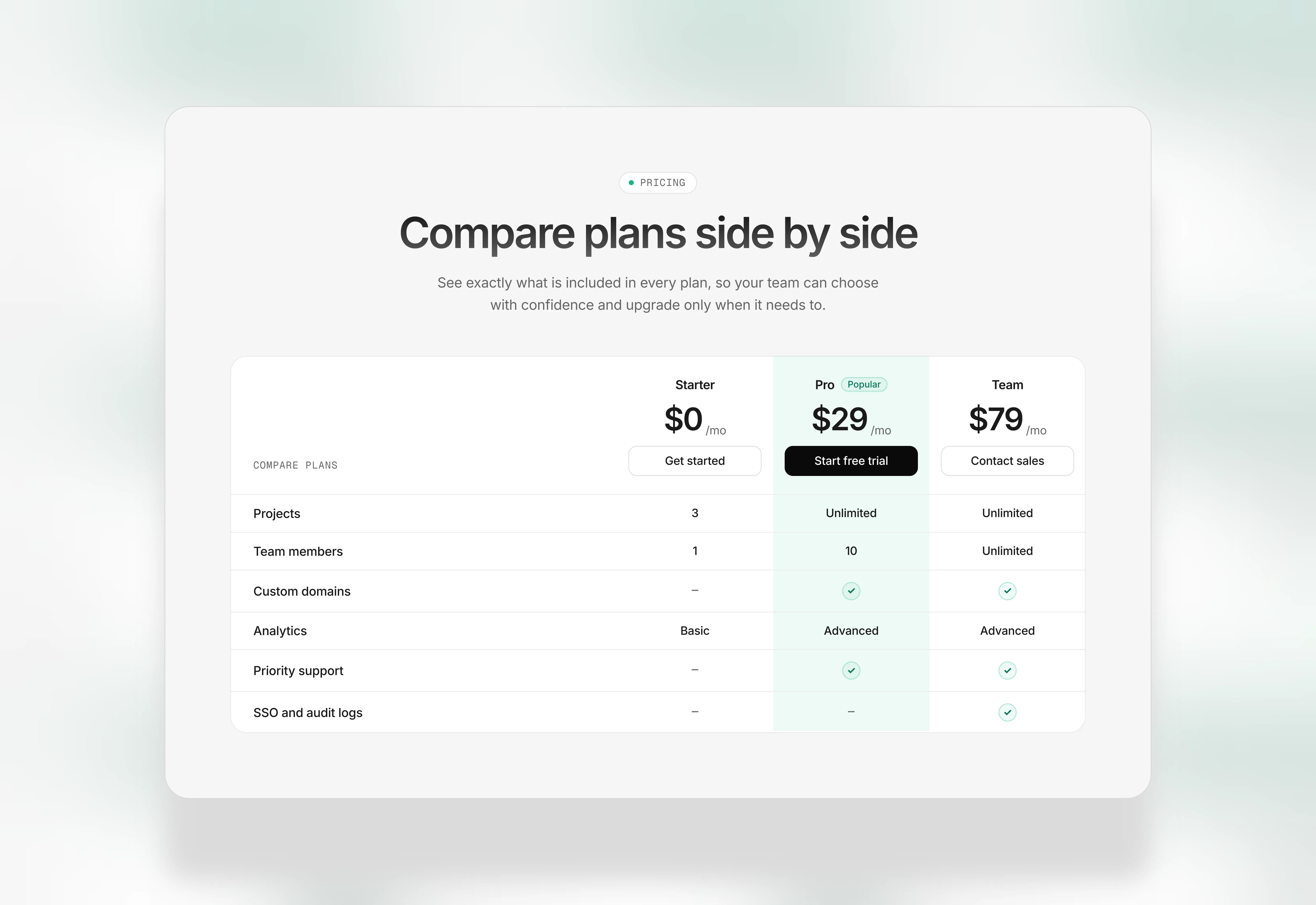
Pricing Comparison Table Section for Framer Websites
Oct 30, 2026

Pricing Section for Framer Single Plan
Aug 15, 2026

Pricing Table with Monthly Toggle for Framer
Aug 15, 2026

Simple Two-Plan Pricing Section for Framer
Aug 15, 2026

Pricing Section with Highlighted Plan for Framer
Aug 15, 2026

Three-Tier Pricing Table for Framer
Aug 15, 2026
The FAQs
Have questions? We got you…
Everything you need to know about our product and billing.
" height="145.6071412712696px" id="yQXBZZpLX" width="80.09859047311576px"/></svg>)
What is Framerstack?
Is there a free plan available?
What about the refund policy?
How I can avail my user license?
Still have questions? Or can't find the right answer? Please contact us. One of our customer support team members will get in touch with you.
Join to the community
Stay in the loop with everything you need to know.
By clicking Submit, you agree to our Privacy Policy and to receive our notifications. You can Unsubscribe anytime.
By clicking Submit, you agree to our Privacy Policy and to receive our notifications. You can Unsubscribe anytime.