

Last updated on:
Video text masker
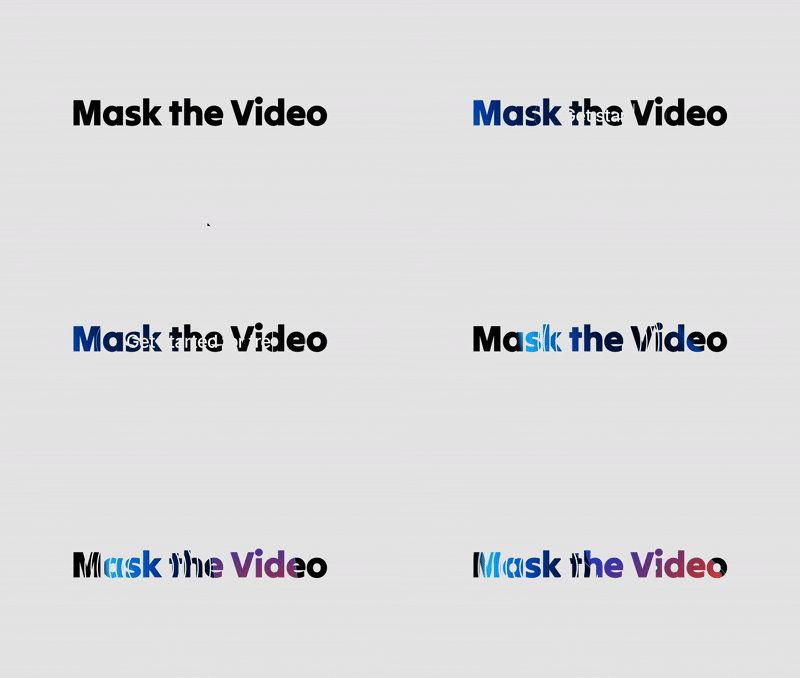
This video text masker is a best choice to mask videos inside a text element. Strongly recommended to use on the hero sections to make the home page stands out and deliver a best visual experience for the visitors.
0
Variants:
1
Theme:
Please note: This component is available only for active license holders. Sign in with your license key or purchase one.
Copying disabled
How to use the component?
Copy and paste this code component into your Framer project.
Sign in if you're unable to copy the component and try again.
Set the "Fill" property for the width and choose "Fixed" for height.
300px is the recommended fixed height for this component. (Adjust to the right matching height based on the text size you pick.
Insert the video source. This component comes with the capabilities of upload from the local device and by URL source.
Autoplay - Keep the autoplay featured turned on for a seamless experience.
Playback speed - Adjust the playback speed from the scale of 0.25x - 2x
Video sound - Keep it in muted mode. Only turn it on if necessary.
Loop - Let the video play on a loop keeps the attention on the page content.
For any type of assistance, don't hesitate to connect with us.
Unlock full potential
Lifetime access
Monthly updates
Access to templates
15+ form templates
Video text masker
This video text masker is a best choice to mask videos inside a text element. Strongly recommended to use on the hero sections to make the home page stands out and deliver a best visual experience for the visitors.
0
Variants:
1
Theme:
Please note: This component is available only for active license holders. Sign in with your license key or purchase one.
Copying disabled
How to use the component?
Copy and paste this code component into your Framer project.
Sign in if you're unable to copy the component and try again.
Set the "Fill" property for the width and choose "Fixed" for height.
300px is the recommended fixed height for this component. (Adjust to the right matching height based on the text size you pick.
Insert the video source. This component comes with the capabilities of upload from the local device and by URL source.
Autoplay - Keep the autoplay featured turned on for a seamless experience.
Playback speed - Adjust the playback speed from the scale of 0.25x - 2x
Video sound - Keep it in muted mode. Only turn it on if necessary.
Loop - Let the video play on a loop keeps the attention on the page content.
For any type of assistance, don't hesitate to connect with us.
Unlock full potential
Lifetime access
Monthly updates
Access to templates
15+ form templates
Video text masker
This video text masker is a best choice to mask videos inside a text element. Strongly recommended to use on the hero sections to make the home page stands out and deliver a best visual experience for the visitors.
0
Variants:
1
Theme:
Please note: This component is available only for active license holders. Sign in with your license key or purchase one.
Copying disabled
How to use the component?
Copy and paste this code component into your Framer project.
Sign in if you're unable to copy the component and try again.
Set the "Fill" property for the width and choose "Fixed" for height.
300px is the recommended fixed height for this component. (Adjust to the right matching height based on the text size you pick.
Insert the video source. This component comes with the capabilities of upload from the local device and by URL source.
Autoplay - Keep the autoplay featured turned on for a seamless experience.
Playback speed - Adjust the playback speed from the scale of 0.25x - 2x
Video sound - Keep it in muted mode. Only turn it on if necessary.
Loop - Let the video play on a loop keeps the attention on the page content.
For any type of assistance, don't hesitate to connect with us.
Unlock full potential
Lifetime access
Monthly updates
Access to templates
15+ form templates
Just like more components
Chat bot for Framer
Dec 25, 2025
Chat bot for Framer
Dec 25, 2025
Content scheduler
Dec 22, 2025
Content scheduler
Dec 22, 2025
3D title card
Dec 14, 2025
3D title card
Dec 14, 2025
Text scrambler
Dec 13, 2025
Text scrambler
Dec 13, 2025
Floating stars
Dec 12, 2025
Floating stars
Dec 12, 2025
Ripple background
Dec 12, 2025
Ripple background
Dec 12, 2025
Appointment scheduler
Dec 10, 2025
Appointment scheduler
Dec 10, 2025
Date picker
Dec 8, 2025
Date picker
Dec 8, 2025
The slider
Dec 8, 2025
The slider
Dec 8, 2025
Load More
Load More
The FAQs
Have questions? We got you…
Everything you need to know about our product and billing.
What is Framerstack?
Is there a free plan available?
What about the refund policy?
How I can avail my user license?
Still have questions? Or can't find the right answer? Please contact us. One of our customer support team members will get in touch with you.
Join to the community
Stay in the loop with everything you need to know.
By clicking Submit, you agree to our Privacy Policy and to receive our notifications. You can Unsubscribe anytime.